NeliDesign

menu icon
go to homepage
  • Projects
    • Cricut Help
    • Home Decor
    • Crafts
    • Organization
  • Materials
    • Adhesive Vinyl
    • Heat transfer vinyl
    • Foil
    • Infusible Ink
    • Paper and Cardstock
    • Pens and Markers
    • Other
  • Free cut files
    • See the free cut files
    • Get the free cut files
      • Get a password
      • Access the Library
  • Shop
  • Français
search icon
Homepage link
  • Projects
    • Cricut Help
    • Home Decor
    • Crafts
    • Organization
  • Materials
    • Adhesive Vinyl
    • Heat transfer vinyl
    • Foil
    • Infusible Ink
    • Paper and Cardstock
    • Pens and Markers
    • Other
  • Free cut files
    • See the free cut files
    • Get the free cut files
      • Get a password
      • Access the Library
  • Shop
  • Français
×
Home

Getting started Cricut 2TW

Intimidated by your Cricut?

Stop feeling overwhelmed and dive into action with this 3 hands-on project Guide.

[wc_fullwidth selector="" class="" style="" background_color="#ececec" border_color="#ececec" max_width="1100px" padding_top="0px" padding_bottom="0px" padding_side="20px"]

SPECIAL OFFER

[ec id="5"]

Regularly $25

Buy it now for only $11

A Maker's Guide to Getting Started with your Cricut

The Maker's Guide to Getting Started with your Cricut is sold only as a digital download.

[/wc_fullwidth]

Don't let your Cricut sit there because you don't know where to start. Master Cricut Design Space with 3 hands-on, simple projects that you can start and finish over the course of a few days.

Does any of this sound like you?

  • You feel overwhelmed by Cricut Design Space and all the functionalities available?
  • You don't want to spend hours learning about Cricut Design Space?
  • You would like to start making something right away but don't know where to start?
  • You wish there was a simple way for you to learn how to master your Cricut and Cricut Design Space?

If you answered YES to any of these questions then the Maker's Guide to Getting Started with your Cricut can help you! 

Get the Maker's Guide to Getting Started with your Cricut

[wc_fullwidth selector="" class="" style="" background_color="#9724c7" border_color="#9724c7" max_width="900px" padding_top="0px" padding_bottom="0px" padding_side="20px"]

What if you could make beautiful projects AND learn at the same time?

[/wc_fullwidth]

Just imagine making your first project right away. Finally, make use of your Cricut and be proud of your accomplishment. By learning and practicing at the same time, you'll avoid the overwhelmed that you get when learning something new. 

And good news! If you can't wait to start, the Maker's Guide to Getting Started with your Cricut is instantly available to you as a digital download sent to your email.

Easy to start projects

Use your Cricut to its full potential

Learn and make useful crafts

Get the Maker's Guide to Getting Started with your Cricut right now!

What is the MAKER'S GUIDE TO GETTING STARTED WITH YOUR CRICUT?

This ebook will show you step-by-step on how to make these 3 simple projects

  • Jar with vinyl label
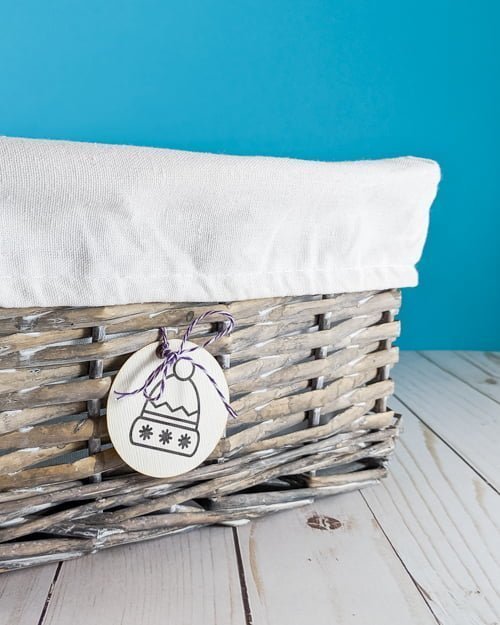
  • label for basket
01

Make a vinyl label for a glass jar

This project will show you how to use and modify free images available in Cricut Design Space.

02

Make labels for your baskets

This project will show you how to create labels using the "Print and Cut" feature.

03

Make an original mini card

This project will show you how to create a mini card by using Cricut pens and the "Draw" function.

Easy to follow step-by-step diagrams will show you exactly where to click and what to do. See for yourself with these sample pages:

Only basic materials are required and the detailed list and links will be available in the Guide. Here's a preview of what you'll need:

  • Cardstock
  • Vinyl
  • Transfer tape
  • Cricut Pen

[wc_fullwidth selector="" class="" style="" background_color="#9724c7" border_color="#9724c7" max_width="900px" padding_top="0px" padding_bottom="0px" padding_side="20px"]

Here's what users have to say about it...

[/wc_fullwidth]

The 3 projects presented are really interesting and very easy to make. With all the tips, we really discover all the parts of Design Space and it is very easy to get by alone afterwards. Each project shows us different aspects of the web page that we can apply to all kinds of other personal projects. The projects are very clear and very well detailed, it is difficult to miss a step!

Anne-Marie B

Anne-Marie B

Design Space can be a little intimidating but Natalie breaks everything down step by step that makes it all so easy! I feel confident to create many projects on my Cricut now after going through this ebook!

Wendy D.

Wendy D.

Don't wait, grab your Maker's Guide to Getting Started with your Cricut now and start crafting immediately

YES! I want the digital Maker's Guide to Getting Started with your Cricut right now!

DOES IT WORKS FOR EVERY CRICUT?

The Maker's Guide to Getting Started with your Cricut is for anyone who uses Cricut Design Space! That means if you have one of these Cricuts, this Guide is for you:

  • Cricut Explore
  • Cricut Explore Air
  • Cricut Explore One
  • Cricut Explore Air 2
  • Cricut Maker

Note that since not all tools and functions are available in the Cricut Design Space app, the Guide is illustrated with the desktop version.


What will you learn?

The Maker's Guide to Getting Started with your Cricut covers all the major tools and functions you need to use on a daily basis. You'll learn how to:

  • Use images freely available in Cricut Design Space (no monthly subscription required)
  • Write and modify text
  • Make and modify shapes
  • Use Score lines
  • Upload images
  • Group / Ungroup
  • Duplicate, Slice, Attach, Flatten and Contour
  • Isolate text
  • Modify the type of lines
  • Change the colour of an object
  • Use the pen to draw shapes and text
  • Print and Cut
  • Align objects
  • Arrange layers
  • Flip objects

How do I know it will work?

You don't, but I do!!

Do you know why? Well, because I've been where you are! Staring at that big box, scared of opening it! Always putting it back to later "when I have more time!".

And once I decided to open it, I didn't know where to start or what to do first. I found out a lot of people were in the same situation that I was. But I was lucky, I had a previous Cricut machine and also a lot of knowledge in working with Design software such as Photoshop and Illustrator.

I decided I could help people that didn't have that knowledge to flush out this overwhelmed and get started making fun and beautiful projects!

The Maker's Guide to Getting started with your Cricut will tell you exactly where and how to start. Then, you'll be confident and pumped to try projects on your own.


FAQ


What is Cricut Design Space?

Cricut Design Space is the web-based program that you need to use in order to send projects to your Cricut.

What is Cricut Access?

Cricut Access is a monthly subscription that gives you unlimited access to images, fonts, and projects that you can find inside Cricut Design Space. But no worries, you don't need it to follow my Guide.

Do I need a subscription to Cricut Access to make these projects?

No! Every project is made with free images that you can find in Cricut Design Space and I will even show you all the tips and tricks on how to find them,

What materials do I need?

Only the basics ones: Cardstocks, vinyl, transfer tape and a Cricut pen (the precise list and links will be in the ebook).

What if I'm brand new to Cricut?

That's perfect, this ebook is exactly for you!

When can I get it?

You'll get the Maker's Guide to getting started with your Cricut immediately after you order it! This is a digital product (nothing will be shipped to you). Keep it on your computer, your phone, or print it out!

How can I get it?

Just click on one of the big blue buttons and follow the instructions. Remember, this is a digital product (nothing will be shipped to you). Keep it on your computer, your phone, or print it out!

What if I don't understand something and need to ask a question?

I'm there for you! In the Guide, I'll give you the link to my Cricut Facebook Group. I'm always there to answer any questions and so are the other members!

I'm ready to use my Cricut! Send me the Maker's Guide to Getting Started with your Cricut!

Don't wait and start using your Cricut right now! Grab the Maker's Guide to Getting Started with your Cricut at the discounted price of just $11!

[ec id="5"]

YES, I want the digital Maker's Guide to Getting Started with your Cricut!

A Maker's Guide to Getting Started with your Cricut is copyright 2020 by NeliDesign. All rights reserved. Cricut® and Cricut Design Space® are registered trademarks of Provo Craft. The use of them does not imply any affiliation with or endorsement by them.

Hi! I'm Natalie

I help crafters create with confidence, useful DIY and craft projects with their Cricut.

More about me

Popular

  • Cricut Maker 4 and Cricut Explore 4: Everything you need to know about these new cutting machines!
  • Cricut's Value materials
  • How to engrave on a curved surface with the xTool S1 laser cutter
  • Difference between xTool M1 and xTool S1 laser cutters

Seasonal

  • Cricut printable Iron-on for light and dark fabrics - everything you need to know
  • How to cut felt with the Cricut Joy and Joy Xtra
  • Using Infusible Ink on cotton
  • Buying a Cricut: where to find the best price

Footer

↑ back to top

Informations

  • Privacy Policy
  • Disclosure
  • CCPA
  • Do not sell my personnal information

Newsletter

  • Sign up for emails and updates

Resources

  • Access the library
  • Discount codes
  • About NeliDesign
  • Contact
  • Français

.

As an Amazon Associate I earn from qualifying purchases.

Copyright © NeliDesign

Manage Cookie Consent
We use technologies like cookies to store and/or access device information. We do this to improve browsing experience and to show (non-) personalized ads. Consenting to these technologies will allow us to process data such as browsing behavior or unique IDs on this site. Not consenting or withdrawing consent, may adversely affect certain features and functions.
Functional Always active
The technical storage or access is strictly necessary for the legitimate purpose of enabling the use of a specific service explicitly requested by the subscriber or user, or for the sole purpose of carrying out the transmission of a communication over an electronic communications network.
Preferences
The technical storage or access is necessary for the legitimate purpose of storing preferences that are not requested by the subscriber or user.
Statistics
The technical storage or access that is used exclusively for statistical purposes. The technical storage or access that is used exclusively for anonymous statistical purposes. Without a subpoena, voluntary compliance on the part of your Internet Service Provider, or additional records from a third party, information stored or retrieved for this purpose alone cannot usually be used to identify you.
Marketing
The technical storage or access is required to create user profiles to send advertising, or to track the user on a website or across several websites for similar marketing purposes.
  • Manage options
  • Manage services
  • Manage {vendor_count} vendors
  • Read more about these purposes
View preferences
  • {title}
  • {title}
  • {title}
Manage Cookie Consent
To provide the best experiences, we use technologies like cookies to store and/or access device information. Consenting to these technologies will allow us to process data such as browsing behavior or unique IDs on this site. Not consenting or withdrawing consent, may adversely affect certain features and functions.
Functional Always active
The technical storage or access is strictly necessary for the legitimate purpose of enabling the use of a specific service explicitly requested by the subscriber or user, or for the sole purpose of carrying out the transmission of a communication over an electronic communications network.
Preferences
The technical storage or access is necessary for the legitimate purpose of storing preferences that are not requested by the subscriber or user.
Statistics
The technical storage or access that is used exclusively for statistical purposes. The technical storage or access that is used exclusively for anonymous statistical purposes. Without a subpoena, voluntary compliance on the part of your Internet Service Provider, or additional records from a third party, information stored or retrieved for this purpose alone cannot usually be used to identify you.
Marketing
The technical storage or access is required to create user profiles to send advertising, or to track the user on a website or across several websites for similar marketing purposes.
  • Manage options
  • Manage services
  • Manage {vendor_count} vendors
  • Read more about these purposes
View preferences
  • {title}
  • {title}
  • {title}